Microsoft System Center Configuration Manager 2007 SP1 Update is available for download.
Archive for the ‘Microsoft’ Category
SCCM: Image Capture Wizard has failed with error code (0x800704CF)
12
May
During image capture process you receive the following error:
Image Capture Wizard has failed with error code (0x800704CF). For more information, please contact your system administrator or helpdesk operator.
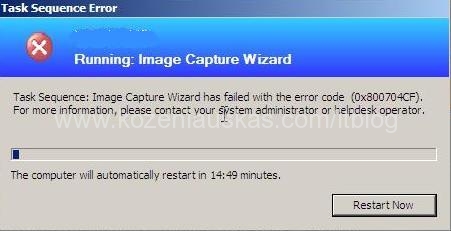
Now if you look at task sequence log it most likely going to say:
Failed to run the last action: Capture the Reference Machine. Execution of task sequence failed.
The network location cannot be reached. For information about network troubleshooting, see Windows Help. (Error: 800704CF; Source: Windows)
This basically means that the network drive that you are trying to capture image to cannot be accessed. Make sure that the user you’ve provided in capture wizard has enough rights to access the network drive and write to it.
Cannot start Exchange 2007 console using Administrator account
29
Apr
On the Exchange 2007 server you are logged on as the Administrator. When you start the Exchange 2007 console you receive Microsoft Exchange Error as displayed bellow:
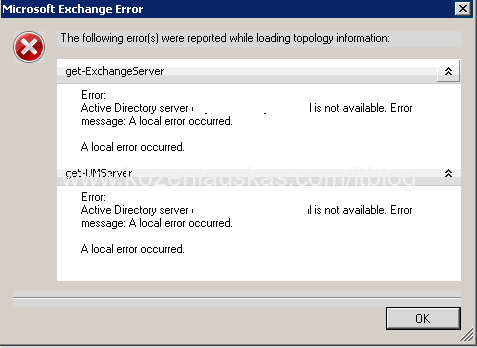
Try to login as different user on the server an start Exchange 2007 console. If that works go to User profiles and delete local administrator profile. Logout and login as administrator this will create the administrator profile and the Exchange 2007 console should start normally.
System Center Mobile Device Manager 2008 Evaluation Edition available for download
18
Apr
System Center Mobile Device Manager 2008 Evaluation Edition available for download
SCCM: Failed to Run Task Sequence
18
Apr
Here are couple steps to diagnose the “Failed to Run Task Sequence” error.
The hole error looks like this:
The task sequence cannot be run because a package referenced by the task sequence cannot be found. For more information please, contact your system administrator or helpdesk operator.
Basically this error means that the problem is with distribution of the package.
It looks straight forward process if you have one or two packages in a task sequence. But can be a problem if the task sequence has many packages. The best way to find out which package or packages are causing the problem is to use the task sequence log Smsts.log. (more…)
SCCM: How to change or modify Boot image background picture for OSD
10
Apr
Before you start changing the background image you have to decide ore going to completely change it or do you want to modify existing. I will describe how to modify existing one. (If you need to change it completely then go to the step where it says “Go back to Configuration Manager Console”)
Open Configuration Manager Console
Go to System Center Configuration Manager>Site Database>Computer Management>Operating System Deployment>Boot Images
You should see two images there x64 and x86 (You will need to change the image for both) (more…)
SCCM logs explained
02
Apr
If you are using SCCM you’ll know that it logs everything in the log files. They are very useful for troubleshooting SCCM problems. The problem I find with log files is that there are so many of them and they are in different places that sometimes it is difficult to find the right log file.
The other day I’ve found a very good article on log files which tells me where the log file is and what it does.
http://www.hermanarnedo.com/?p=8
Windows Search 4.0 preview is available for download
28
Mar
Windows Search 4.0 preview is available for download.
