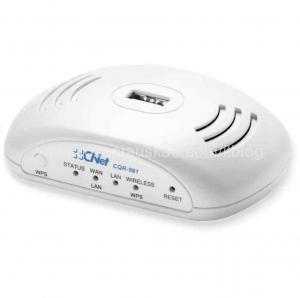
 I was having problems with CNet CQR-981 Wireless-N Pico 3.5G Broadband Router and Huawei 3G USB modem.
The router would not connect to the 3G network after checking all the setting and making sure that the 3G USB modem is working fine I’ve decided to check if there is a newer firmware version for CQR-981. The version on my router was 1.0.02 and the latest on the CNet website was 1.0.06.
I’ve flashed the latest firmware to the router and after restart it connected to 3G straight away.
You can find the latest version here. Download the firmware file. The file is a RAR archive that contains 2 files: the firmware file and also the PDF file with the instructions how to perform update.
Tags: 3G USB modem, CQR-981, Huawei

Hi,
try to get telnet access and play around with settings for that. You will need to get R/W access to mounted squashfs root (i don’t know how yet …).
Root telnet access:
hidden system command page http://192.168.1.1/obama.asp
run command “/bin/telnetd -l /bin/sh”
and then you can telnet to your router as root (no login required)
enjoy
i have the 981 and huawei, update the firmware, but doesnt work well, the led blink but disconect. what can do? thanks
If you have the latest firmware then there is not much you can change. Check to see if the 3G signal is OK in the area. Also you could try to use another USB modem(better other brand/model) to see if the problem persists. Then you can narrow it down to modem or router.
Dear all
here we have updated the latest firmware, but after that we entered the 3G settings and finished.
then the web page displayed “the page can’t displayed.
can anyone help us
Try reseting the router ro factory defaults. Press and hold reset button for 5 seconds. Then use default IP 192.168.1.1 to connect to it.
We have done with 981 model and all the modles are working now after adding the new firmware
Great now
i cant!!! i upgrade to today, but my huawei E176 doestn work. help!
thanks
I have a Novatel U727 USB mdem from the carrier named VIVA in Dominican Republic. I setup the router to CDMA/CDMA2000 connection, automatic speed. The Username is: “8093081862@interjet.com.do” and the password is: “interjet”. The dialing number is: “#777” (all of it without the quotes[“]). Still always shows disconnected.
I upgraded to the latest firmware (CQR-981(A)_FW_1043_20110614), and it shows that this USB CDMA EVDO modem is supported since january 2011. Any advice? This is driving me crazy. I have coverage, because it works perfectly when plugged to my PC, but it just won’t connect when attached to the router (CQR-981), What am I doing wrong?
Thanks.
You also need to enter APN of your mobile provider in configuration page if you have not done so.
When in CDMA/CDMA2000 that option is grayed out.
I have a desktop and only one usb 3g to connect to the internet.I have a question:when I set up ,my usb 3G must be connected to cqr-981?
Yes, it does.
I have a Huawei E353 it seems is incompatible with this router… i had upgrade the firmware… Same results.
I have Huawei EC159 not working please halp me
not working with e 173 huawei dongle.help. it keeps resetting