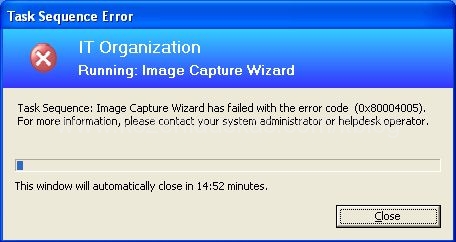
Here is an error that I’ve received when I was trying to capture an image of a PC for SCCM. This error appears straight away after you click on finish button in Image capture wizard. The log does not give any clues.
Here is the screenshot of an error.
In my case it was caused by SMS2003 client on the PC.(The PC was build using SMS2003)
Removing SMS2003 client solved the problem.
Tags: 0×80004005, 80004005, Image capture, OSD, SCCM

Thank you alot!
Glad to know it helped.
I just had the same error, but it was a sysprep.ini issue. I was using an old one, but once I used a clean one, the error cleared itself. Hope this helps….
I am also having the same issue but the capture fails half way through. That is I see it copying the files over to a shared directory and the it just fails???. Mmmm not sure whats happening there.
Same issue here, sysprep.ini was causing the errors. I deleted the content and reran the capture successfully
check the certificate on the pxe service point and the boot certificate. also make a new capture cd and boot cd to try to renew or creat a new certicate….then recapture the image…etc.
Hi everyone,
I had the same problem and discoverd that the local password policy “password must meet complexity” was enabled.After disableing this sysprep workt fine.