Here is my first Powershell problem. I’m not good in powershell as I don’t use it too often but ussually i find my way pretty quickly. Well except this time…
So here is my problem:
I have old Altiris Deployment server that I use for deploying server images. When I’m imaging 2008R2 servers I need to install server Roles and Features. Powershell here comes pretty handy as I only have to use Add-WindowsFeature command plus a list of Roles or Features that I want to add.
I created a file called powershell.ps1 that adds all the roles and features that I need plus does some configuration. I ran powershell -command powershell.ps1 on the test server to see if everything is installed and configured as expected. Everything went OK.
So next in Altiris I create a new job that copies a powershell.ps1 file and then runs it. Continue reading Powershell command would not run
All posts by Andrius
A problem occured while installing selected Windows SDK components. Unknown property.
Here is one of the problems that took me some time to figure out.
I had to install Microsoft Windows SDK for Windows 7 and .NET Framework 4 on Server 2008 R2. But it would not install.
There are 2 ways to install it:
Web install using winsdk_web.exe a small too that download all the files during installation.
ISO imgae that has all required files already.
I’ve tired both methods and bot of them failed almost instantly with the following error message:
A problem occured while installing selected Windows SDK components. Unknown property.
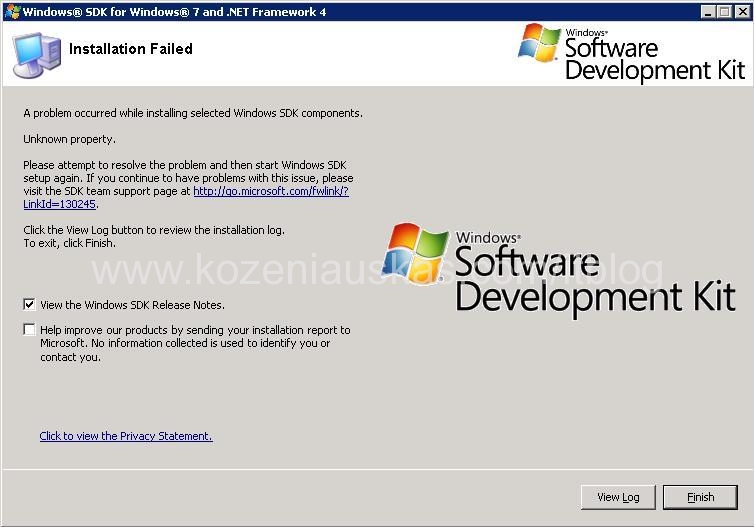
Continue reading A problem occured while installing selected Windows SDK components. Unknown property.
System.Exception: No certificate was found in the cert store for user
Recently I’ve wrote about certificate problem in WCF applications. Here is another one:
When starting WCF application the following error is logged Event ID: 0
Internal exception occured: System.Exception: No certificate was found in the cert store for user: comp_1WCF_AppUser
So first lets see what certificate is the application looking for. Locate the application files and open application config file with notepad.
Now search for serviceCertificate you should see the line like below:
<serviceCertificate storeLocation=”LocalMachine” storeName=”My” x509FindType=”FindBySubjectName” findValue=”*.domain.local”/>
As you can see the application is looking for * wildcard certificate called *.domain.local
Open Certificates management console and make sure that the certificate named in config file is there. If not, you need to import it.
Continue reading System.Exception: No certificate was found in the cert store for user
How to read registry value remotely in all computers in the domain
I had a task to find out what versions of PowerShell we have installed on the computers in the domain.
PowerShell version is stored in HKEY_LOCAL_MACHINESOFTWAREMicrosoftPowerShell1PowerShellEngine
There is a a string called PowerShell version and the value of the string is the version of the PowerShell that is installed on the computer.
After looking around I came up with the following script:
On Error Resume Next
Dim objGroup, objFSO, strFile, objFile
Const HKEY_LOCAL_MACHINE = &H80000002
Const ForWriting = 2
Const OpenAsASCII = 0
Const CreateIfNotExist = True
Const ADS_SCOPE_SUBTREE = 2
strFile = “c:powershell.txt”
Continue reading How to read registry value remotely in all computers in the domain
Cannot load the X.509 certificate identity specified in the configuration
You have a WCF application and trying to run it but it would not start.
In application event log you see Error event logged with Event ID 0:
2011-02-02 13:46:52 [(null)] [ApplicationName] [FATAL] –
— Exception data associated with the Log entry —System.InvalidOperationException: Cannot load the X.509 certificate identity specified in the configuration.
at System.ServiceModel.Description.ConfigLoader.LoadIdentity(IdentityElement element)
at System.ServiceModel.Description.ConfigLoader.LoadChannelBehaviors(ServiceEndpoint serviceEndpoint, String configurationName)
at System.ServiceModel.ChannelFactory.InitializeEndpoint(String configurationName, EndpointAddress address)
at System.ServiceModel.ChannelFactory`1..ctor(String endpointConfigurationName, EndpointAddress remoteAddress)
at System.ServiceModel.ChannelFactory`1..ctor(String endpointConfigurationName)
at System.ServiceModel.EndpointTrait`1.CreateSimplexFactory()
at System.ServiceModel.EndpointTrait`1.CreateChannelFactory()
at System.ServiceModel.ClientBase`1.CreateChannelFactoryRef(EndpointTrait`1 endpointTrait)
at System.ServiceModel.ClientBase`1.InitializeChannelFactoryRef()
at System.ServiceModel.ClientBase`1..ctor()
Continue reading Cannot load the X.509 certificate identity specified in the configuration
Where is my disk space? Part 2
OK here we go again another server and another space issue.
Windows folder was taking 48GB which is a bit on the high side. So I was started cheking which file or folder is eating the space and found that c:windirwinsxs was the one. Now there are a lot of folders in there and almos all of them are needed. In c:windirwinsxsManifestCache you should see a file or two called something xxxxxxxxxxx_blobs.bin and this one in my case was taking 23GB. The good news is that you can get rid of it and here is how:
Stop trustedinstaller service
Take ownership of the xxxxxxxxxxx_blobs.bin file
Grant yourself full right to the file
Delete the file.
Start trustedinstaller service
As soon as you start the service the file will be recreated but it will be much smaller.
oops I did it again :)
another win in Navan Camera Club but this time in two categories.
The theme of the competition was Transport also a separate category was for the outing that we had a week ago in Botanic gardens.
I was only able to submit 3 digital pictures as I was too late to make prints. But one of my pictures won in digital category in Transport theme and also I won in outing competition.
[nggallery id=15]
Error: The security database on the server does not have a computer account for this workstation trust relationship
I had to change the Primary DNS suffix to some servers. To do that the server were moved to a separate OU and a Group Policy was applied to that OU to change the DNS suffix.
I’ve issued gpupdate /force command on the servers and restarted them. After restart I was not able to login to some of them with my domain credentials. Only servers with Windows Server 2008 were having this problem. Windows 2003 servers were running as expected. The error that I was getting was: The security database on the server does not have a computer account for this workstation trust relationship.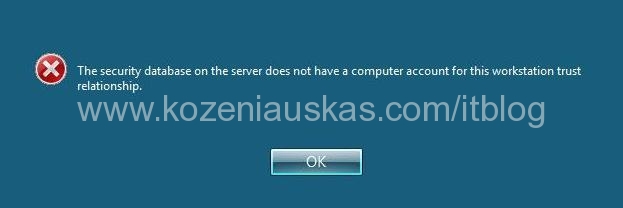
Continue reading Error: The security database on the server does not have a computer account for this workstation trust relationship
My SCCM blog was referenced in the book
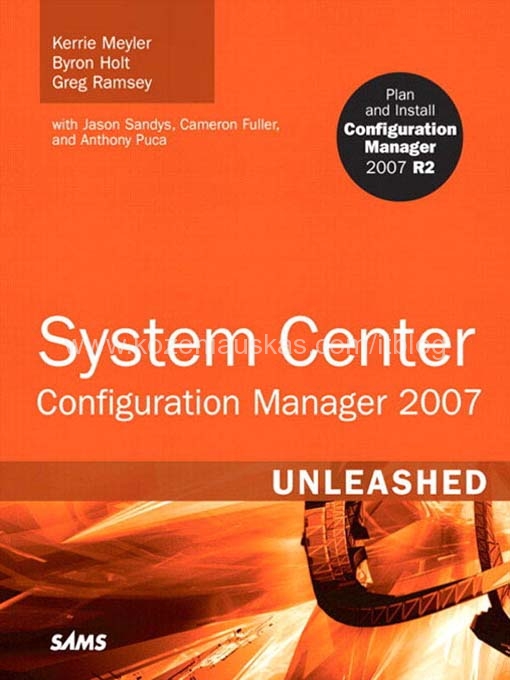
This come as a complete surprise to me.
I’ve found out that my blog was referenced in the System Center Configuration Manager (SCCM) 2007 Unleashed book that was published in 2009 by SAMS. In page 1108 you can find my name and URL to the blog, although last year I’ve changed the naming in my domain but I’m going to make the link in the book work.
Here are book details:
Paperback: 1224 pages
Publisher: Sams; 1 edition (August 2, 2009)
Language: English
ISBN-10: 0672330237
ISBN-13: 978-0672330230
http://www.amazon.com/System-Center-Configuration-Manager-Unleashed/dp/0672330237#_
Experiments with light
[nggallery id=14]